
Required Documents for Annapurna Bhandar Scheme

Compile, scan, and verify your personal and banking documents before uploading them to the registration portal. Follow our detailed file specifications.

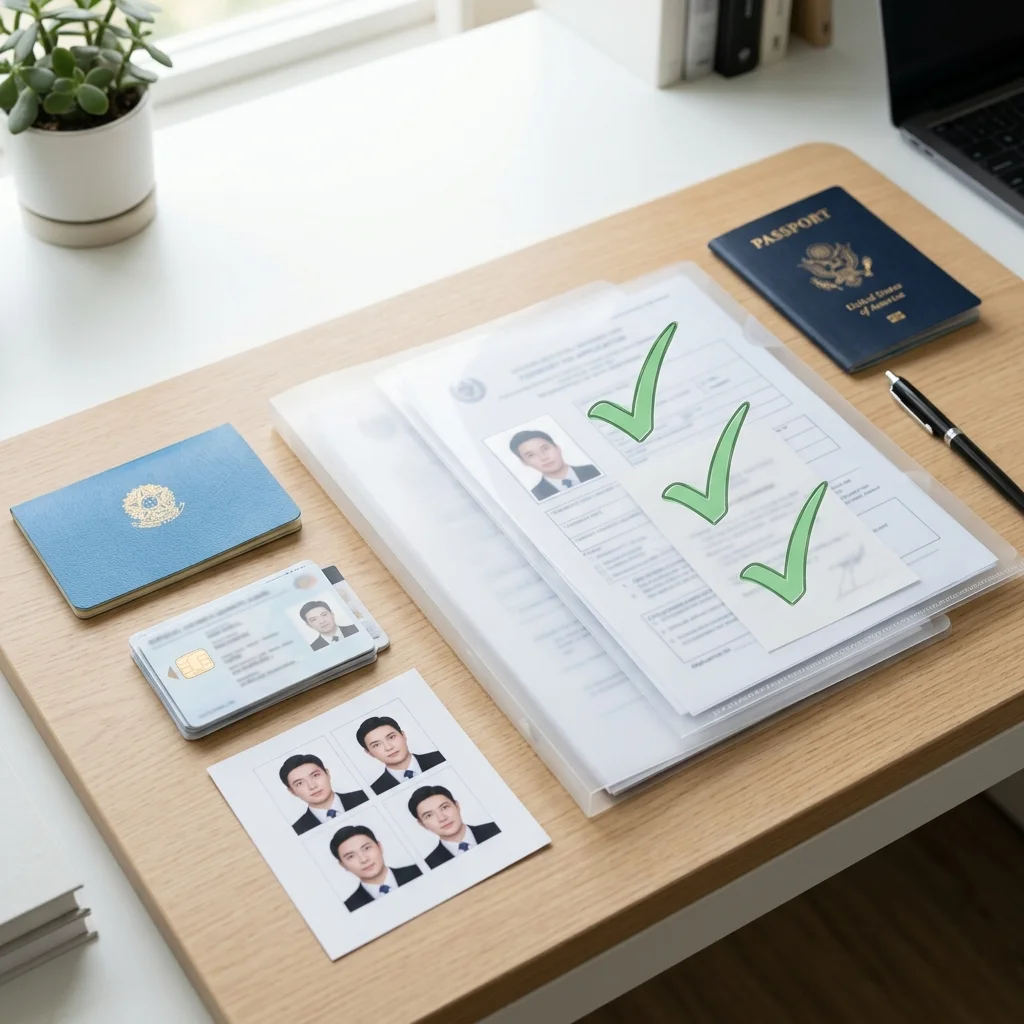
Stacked folders and documents representing verification files

Essential Personal Identification Documents

The online application processes verification using database syncs with state registers. You must scan and upload the following personal identification documents. Review details on our welfare homepage.

Each document must be valid and readable to prevent block reviewers from placing your application on hold. The social security portal parses these files using automated validation systems, so ensure all details match your active registries before uploading.

Aadhaar Card copy

A scanned copy of the front and back of your Aadhaar Card is mandatory. The name character string must match your bank account details exactly. Biometric locks must be unlocked via mAadhaar or UIDAI registry before uploading. Linkage with active mobile number is required to receive login verifications.

The scan must show your photograph and 12-digit number clearly. Avoid uploading blurry copies or photos with camera flash glare, as block reviewers use automated character readers to parse names and matching details during entry verifications.

To verify your current Aadhaar linkages, check your active mobile status. The state database performs automatic matches against your registered phone profile, making it vital to ensure that your biometrics and contact strings are updated before beginning the registration process.

Voter ID Card Specs

The Voter ID card (EPIC) is used to verify your permanent residency in West Bengal. Upload a clear, readable scan of the card showing your full address. Mismatched details in residency records or address proofs will flag the file during block development checks.

Ensure your EPIC number is entered correctly on the portal. Review teams check address registries against regional property rolls and electoral logs to confirm residency rules, making it essential to submit readable card scans.

If your Voter ID card contains spelling errors or outdated addresses, submit a correction request via the NVSP portal. Having matching records prevents municipal desk officers from putting your application on hold during address validation checks.

Digital Ration Card

Upload your Digital Ration Card to confirm family profiles and verify family relationships. The registry allows only one female head per household card to apply. Ensure the card is active and matches local block revenue registries.

Ration card details allow the portal to identify household members and prevent duplicate claims. If your card was issued in another district, ensure it is updated to your current address block before initiating online registration.

Ensure your digital card is properly categorized. The system prioritizes cards under specific social categories to process benefits, making it important to confirm that your family's records are active on the food safety portal before filing.

SC/ST Caste Certificates

If applying under SC or ST categories, upload a valid caste certificate issued by the Sub-Divisional Officer (SDO) of West Bengal. General category applicants do not need this file. Ensure the certificate matches the family name in social registry databases.

The certificate number must be entered on the portal for verification against the state social welfare log. Outdated or hand-written certificates are not accepted; only digital certificates with active barcode links will clear audits.

If you are submitting certificates issued by other states, they will not be recognized for the category waiver. The system accepts only those certificates issued directly by competent authorities within West Bengal to confirm special category eligibility.

Financial & Bank Document Guidelines

Bank details are verified by treasury payment nodes to execute monthly direct transfers. Compile the following bank files carefully to avoid transaction errors.

The treasury utilizes the Public Financial Management System (PFMS) to verify beneficiary account details. Direct benefit transfers can only route to single savings accounts that are active and seeded with your Aadhaar number.

Bank Passbook (Single Account)

A clear scan of the front page of your bank passbook is required, showing your name, account number, branch details, and IFSC code. The account must be a savings account held in the applicant's name. Joint accounts are rejected by treasury nodes. Refer to scheme details.

If the passbook ledger is hand-written, ensure the bank branch stamp is visible and clear. Alternatively, upload a cancelled cheque or a digital statement containing matching bank details to prevent verification holds during DBT reviews.

Avoid using savings accounts that have been inactive for over six months. Banks place dormant holds on such accounts, which causes the direct treasury transfers to fail during monthly payment cycles, delaying your benefits.

Active NPCI Aadhaar Seeding

Seeding your bank account with Aadhaar is mandatory. Transactions are processed via the NPCI mapper grid. Submit a seeding form at your bank branch or verify seeding status online. If your bank merged recently, update your IFSC details before seeding. Check status logs.

NPCI mapping connects your Aadhaar to your account, allowing the Aadhaar Payment Bridge to route cash transfers. Payouts cannot proceed to unseeded accounts, making bank confirmation forms mandatory for registry approvals.

If you open a new bank account, you must request the branch coordinator to update the NPCI mapper registry. This bank-side process can take up to two weeks, so verify your active seeding status before portal submission.

Income Certificate validation

Provide an income certificate issued by a block development officer (BDO), municipal desk, or local Panchayat/Municipality. The certificate must confirm that the annual family income does not exceed ₹2,00,000. Outdated income certificates will cause review delays.

The certificate must be signed by competent revenue officers and dated within the last six months. Submit clear scanned copies on the portal, ensuring the family income details declared match certificate statements exactly.

The certificate must list the cumulative earnings of all family members residing under the same roof. Mismatches between your online declaration and the certificate will trigger a BDO review hold, requiring manual verification.

Passport Size Photos

Upload a recent colored passport photograph. The photo must be clear, showing your full face against a light background. Selfies or group pictures are not accepted. The image is mapped to your profile in the state social registry, ensuring security.

The photo must be saved in JPG or JPEG formats under 50 KB. Review teams match photo files against Aadhaar registry images to verify identity, reducing the risk of duplicate files or fake profiles in the registry database.

Do not wear dark glasses, caps, or uniforms in the photo. The state system uses facial matching to cross-check profiles with UIDAI records, so uploading a clear, simple portrait speeds up your application approval.

Scan Resolution & Compression Guides

Many online applications are flagged simply due to blurry scans or incorrect file formats. Follow these guidelines to prepare your documents for successful uploads. Reviewing scanning parameters reduces verification errors and ensures automated database systems parse details correctly.

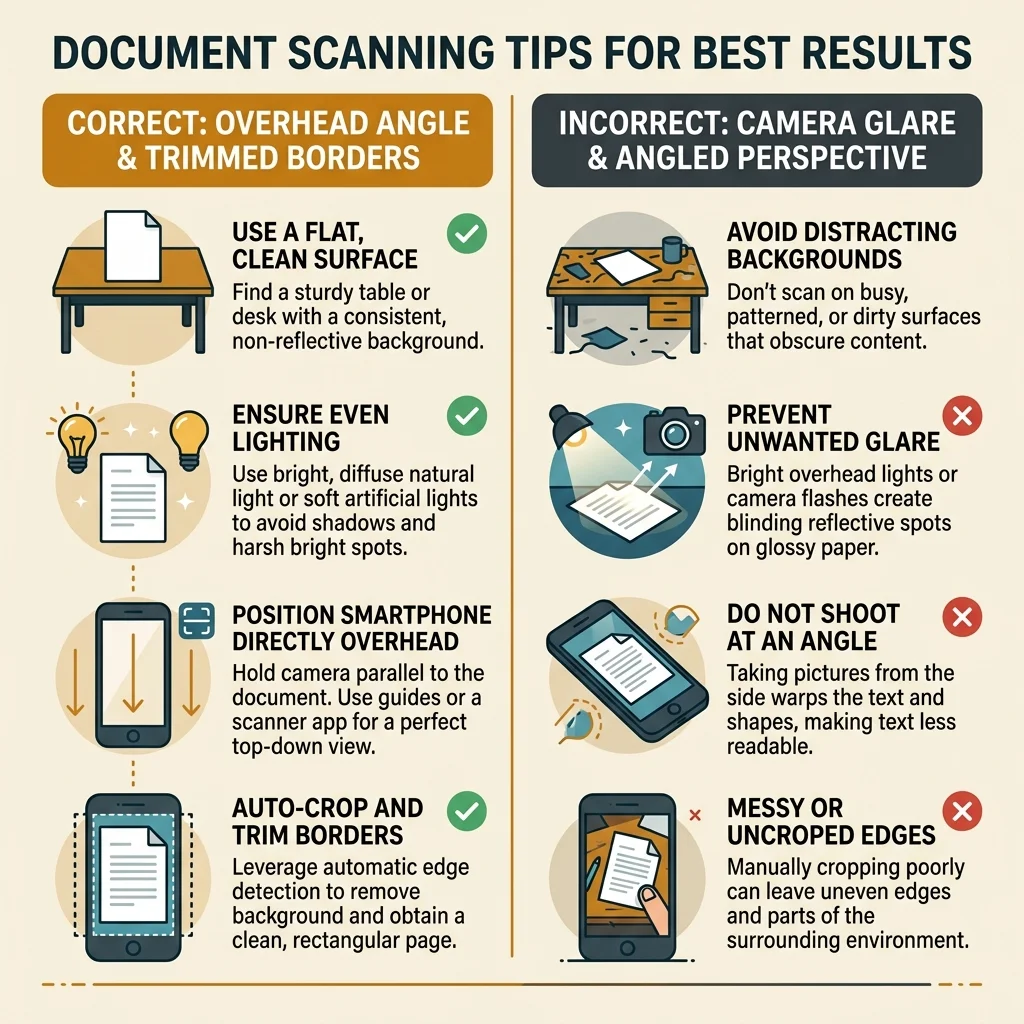
Preparing clear files speeds up BDO review timelines. Use dedicated mobile apps and verify that text characters and bank account numbers are sharp and legible before uploading them to the registration dashboard. Check our interactive scanner guidelines for detailed instructions on background lighting and edge cropping.

Document Scanning Guidelines Infographic: Correct Angles and Clear Backgrounds vs Flash Glare and Shadows

File Formats Accepted

The portal accepts files in PDF, JPEG, or JPG formats. Other formats like Word documents or raw mobile camera images are not supported. Ensure files are saved in these formats before initiating the upload. Details on application guides.

If your scanner app generates TIFF or PNG files, use a free online converter to save them as JPEG or PDF. Uploading unsupported file formats will trigger portal upload blocks, preventing form completions.

Ensure that files do not contain spaces or special characters in their filenames. Simple names like aadhaar.pdf or passbook.jpg help prevent upload errors on the Social Security Portal.

File Size Requirements

Each document must be under 500 KB. Large files will trigger upload errors or slow down the submission. Use a free online compressor tool to reduce file sizes while maintaining text readability, ensuring that text is legible.

If files are compressed too much, text becomes pixelated and illegible, causing block officers to suspend the application. Aim for a balanced resolution between 150 KB and 300 KB to guarantee clear, fast uploads.

If your compressed files are too low in resolution, the BDO auditing team will reject the application due to unreadable text. Aim for clear scan details while keeping the file size just under the 500 KB limit.

Scanner App Recommendations

Use a dedicated mobile scanner app (like Adobe Scan, Microsoft Lens, or Doc Scanner) to capture documents clearly. Place the document flat on a well-lit surface, ensuring all text is legible and borders are trimmed. Avoid camera glares.

Scan documents from a direct overhead angle to avoid perspective distortion. Auto-cropping functions help trim excess background details, keeping the focus entirely on the identity card or passbook records.

Make sure the scan is captured in color. Black-and-white scans can obscure official stamps or seals, prompting block officers to request resubmissions, which extends your review window.

Trim Borders & Check Details

Ensure all text and numbers are clearly visible on bank passbook scans. Trim excess borders around documents. Do not crop out essential signatures, stamps, or barcodes, as these are verified by block development officers.

Before submitting files to the portal, review the scanned copies on your screen. If bank numbers or names are blurry, re-scan the document. Readable files prevent verification delays and speed up approvals.

If the scanned copy cuts off any border details or page corners, the validation system may reject it as incomplete. Keep the entire document face visible, including all signatures, dates, and official seals.

Post-Upload Review & Verification Desk Roles

Once you submit your documents online, they are reviewed by different administrative blocks. Understanding these roles helps you identify which office holds your application file. The verification flow operates on a systematic database queue to audit details before treasury release.

Different verification desks perform specific sweeps on your records. If discrepancies are found, the portal updates status notes, and applicants can check comments to resolve holds. We recommend keeping physical photocopies of all submitted documents in case administrative desks request offline audits. Review details below:

BDO Documents Audit

Local block offices receive files immediately after online submission. Verification officers check scanned document resolutions and cross-reference names with the state social database to identify discrepancies.

If the documents are clear, officers update the review logs and route the file to municipal headers. If errors are found, BDO teams post status notes detailing required corrections on your online dashboard.

Income Registry Check

Special revenue cells verify the submitted income certificate against state tax records. This step ensures that the household qualifies under the annual income threshold of ₹2,00,000.

If the audit finds undeclared assets or commercial property holdings, the application is suspended. Qualifying applicants clear this sweep automatically when their certificates match database records.

Bank Seeding Validation

The state treasury cell runs digital sweeps to verify bank account links. The system coordinates with the NPCI mapper to confirm that the applicant's Aadhaar is seeded for direct bank transfers.

If seeding checks fail, treasury nodes record a payment block, and the status tracker flags the error. Reactivating seeding at your bank branch resolves the hold, enabling direct benefit routing.

Final Approval Sweep

The central department runs a final verification run to check for duplicate applications within a single household. This final sweep ensures that benefits are routed to one female head per family.

Once the final sweep is cleared, the portal updates your status to approved, and the treasury cell registers your bank account for monthly direct payouts of the ₹3,000 monthly benefit.